Best Outlook Add-Ins 2026: OpenSlot, Boomerang, Unroll.Me + 2
We tested dozens of extensions from the Microsoft Marketplace and narrowed it to five tools that genuinely save time in 2026, every one of them free to start.
- Folder Suggest — AI-powered email filing that suggests the right folder for any message, with no rules to set up. Top pick overall.
- OpenSlot — Paste-ready lists of when everyone is free. Strongest option for proposing times without a booking link.
- Boomerang — Schedule send and follow-up reminders. Ideal for managing replies across time zones.
- Unroll.Me — Bulk subscription management. Ideal for taming newsletter clutter.
- Microsoft To Do — Turn emails into tasks. Strongest option for task capture inside Outlook.
Microsoft Marketplace lists thousands of Outlook extensions. Most are too niche to matter, too complex to bother with, or too expensive for what they offer. The five below address the pain points that come up most often: email filing, sending your availability, scheduling, subscription noise, and task capture. Three of them are add-ins from Microsoft Marketplace; Microsoft To Do is built into Outlook and Unroll.Me is a separate web service. If you're not sure where add-ins live in your Outlook, or the button is missing, see how to get Outlook add-ins below.
Add-in #1
Folder Suggest — AI-Powered Email Filing
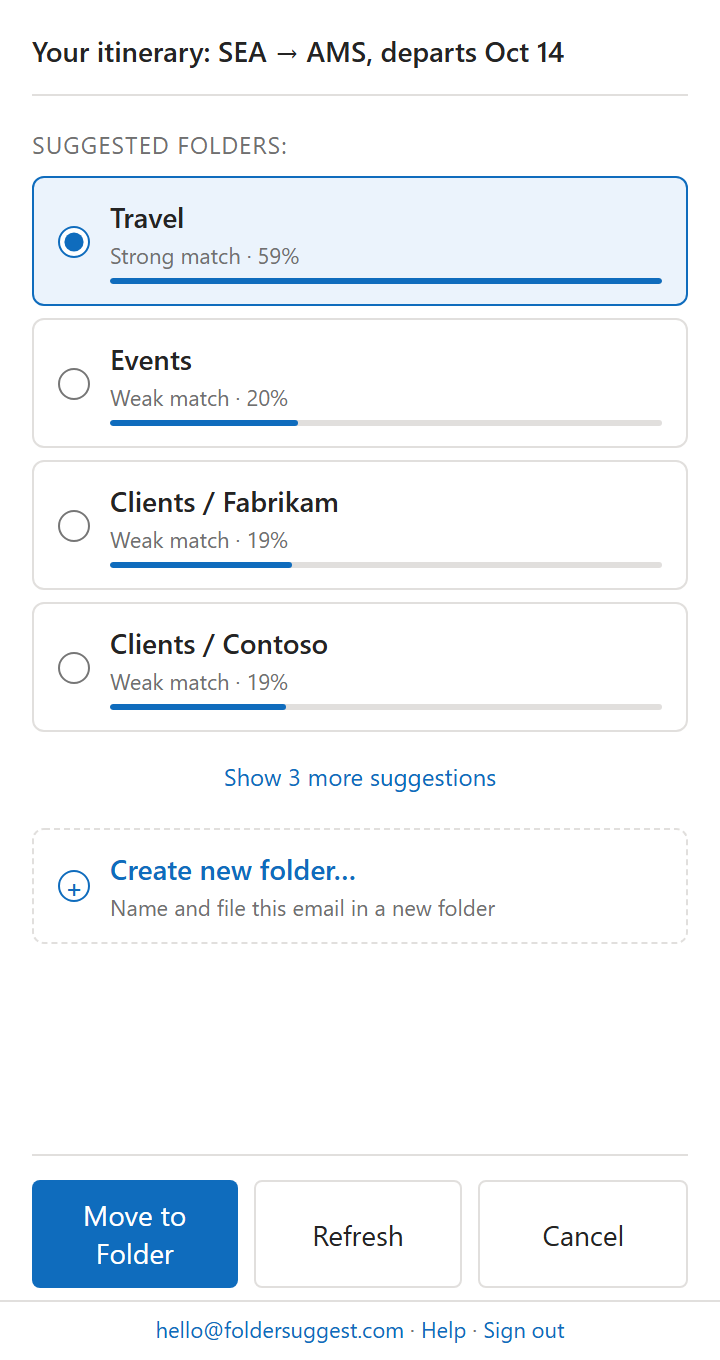
If you organise your Outlook folders to manage email, Folder Suggest is the most impactful pick on this list. It runs an on-device AI model that analyses the email you're reading (sender, subject, body) and ranks your existing folders by how closely they match. The top suggestion is pre-selected; one click moves the message. It's the simplest of the ways to automatically file emails in Outlook, and the only one that needs no rules at all.
Unlike Outlook Rules, Folder Suggest requires zero configuration. There are no conditions to write and no rules to maintain. It handles ambiguous messages that rules can't. An email from your accountant about a specific project gets the right folder even if no rule exists for it.
All processing happens locally on your device. Your email content is never sent to our servers or to any AI service. The model (~23 MB) downloads once from Folder Suggest's own servers and runs entirely inside the add-in.
- Who it's for: Anyone with a complex folder structure who spends real time filing email.
- Standout feature: Context-aware suggestions without any setup or maintenance.
- Privacy: Fully on-device. No email content ever leaves your machine.
- Pricing: The free plan files 5 emails a day, forever, with every AI feature included. Pro removes the daily limit at €7.99/month or €79/year, after a 7-day free trial.
Add-in #2
OpenSlot — Paste-Ready Availability Lists
OpenSlot answers the question that starts most meeting threads: when is everyone free? It reads Microsoft 365 free/busy for you and the colleagues you pick, then drops a clean list of every slot where you're all available into the email you're already writing, grouped by day and in whichever timezone you choose.
There's no booking page and no voting round. The recipient gets times as plain text they can answer in one word, which is what you want when you're writing to a candidate, a client, or anyone who won't click a scheduling link. It reads calendar free/busy only, so it never sees meeting titles or attendees, and it stores no calendar data. OpenSlot launched in September 2026, which makes it the newest pick on this list.
- Who it's for: Executive assistants, recruiters, and anyone who proposes times on behalf of a group.
- Standout feature: Merges up to 40 calendars into one paste-ready list, up to 60 days out.
- Privacy: Read-only free/busy. No meeting titles, and availability is computed per request rather than stored.
- Pricing: Free for you plus one other person over a 7-day window, with a one-line "made with OpenSlot" credit on the lists it produces. Pro is $7/user/month, or $72 a year, for up to 40 people and a 60-day window. Every account starts with a 14-day Pro trial.
Add-in #3
Boomerang — Schedule Send and Follow-up Reminders
Boomerang is a time management layer for your inbox. Its two headline features are scheduled send (compose now, deliver later) and follow-up reminders (bring a message back to the top of your inbox if you haven't heard back in X days).
Scheduled send is particularly useful when working across time zones. Write a reply in the evening and schedule it to land at 9am the recipient's time. Follow-up reminders solve the "I need to chase this if I don't hear back" problem without keeping messages starred indefinitely.
- Who it's for: Anyone managing client relationships, sales, or cross-timezone communication.
- Standout feature: Follow-up reminders that surface messages automatically if unanswered.
- Pricing: Free Basic plan; paid plans from $4.99/month billed annually, after a 14-day trial of Pro.
Add-in #4
Unroll.Me — Subscription Management
Newsletter and subscription overload is one of the most common inbox complaints. Unroll.Me scans for subscription messages and lets you unsubscribe in bulk, or roll them up into a single daily digest instead of receiving them throughout the day.
It won't replace the need to file important messages (that's what Folder Suggest handles), but it dramatically reduces the volume of low-value mail that clutters your view and dilutes your attention.
- Who it's for: Anyone overwhelmed by newsletters, marketing messages, or notification spam.
- Standout feature: Bulk unsubscribe and daily digest rollup.
- Setup: It isn't installed in Outlook. You sign in at unroll.me and connect your mailbox. Work and school accounts may need an administrator to approve the connection first.
- Availability: Not offered in the EU or the European Economic Area.
- Note: Unroll.Me's business model involves anonymised data. Review their privacy policy before use.
Add-in #5
Microsoft To Do — Email to Task
Microsoft To Do integrates natively with Outlook: flag a message as a task with a single click, set a due date, and it syncs to your To Do list automatically. If your inbox doubles as a to-do list (a habit most productivity advisors recommend breaking), this is the cleanest way to migrate action items into a proper task manager.
Because it's first-party, it works reliably across all Outlook versions and doesn't require any extra accounts or subscriptions beyond your Microsoft 365 licence.
- Who it's for: People who use their inbox as a task list and want a structured alternative.
- Standout feature: One-click message-to-task with due date and reminder.
- Pricing: Free with any Microsoft 365 account.
How to Get Outlook Add-Ins
Outlook add-ins come from Microsoft Marketplace, and you add them from inside Outlook. Where the button sits depends on which Outlook you use:
- New Outlook for Windows and Outlook on the web: select Apps (or More apps) in the bar on the left, then Add apps. Search for the add-in and click Add.
- Classic Outlook for Windows: on the Home tab, select All Apps (Get Add-ins in older versions; with the simplified ribbon it is behind …), then Add Apps. Search and click Add.
- Outlook for Mac: add it in Outlook on the web with the same account. Add-ins belong to your mailbox, not the device, so it then shows up in the Mac app too.
You can also start from the Marketplace website: open the add-in's listing, click Get it now and sign in with the account you use in Outlook. On most Microsoft 365 accounts none of this needs administrator rights.
Why the button is missing or greyed out
There are three usual causes, and which one applies depends on your account:
- The mailbox is connected by IMAP or POP. Add-ins only run on Microsoft 365, Exchange and Outlook.com mailboxes. If you added a Gmail or internet-provider account to classic Outlook, the button is greyed out while that mailbox is selected. Check under File > Account Settings > Account Settings: the Type column should say Microsoft Exchange.
- Connected experiences are switched off. Store add-ins count as an optional connected experience in Microsoft 365. If yours are off (File > Office Account > Account Privacy > Manage Settings), Outlook hides or disables the button.
- Your organisation has turned add-ins off. On a work or school account, IT can block add-ins or allow only approved ones. If you don't see All Apps at all, Microsoft names this as the likely reason. Ask IT to deploy the add-in to you from the Microsoft 365 admin center.
Will an add-in work in your version of Outlook?
That depends on which kind of add-in it is. Older add-ins, called COM or VSTO add-ins, are programs installed on a Windows PC, and they only run in classic Outlook for Windows. Web add-ins come from Microsoft Marketplace and run in classic Outlook, new Outlook, Outlook on the web and Outlook for Mac. Microsoft does not support COM add-ins in new Outlook, so when you switch, a COM add-in disappears until its maker ships a web version. SimplyFile is a current example.
Of the five picks above, Folder Suggest, OpenSlot and Boomerang are web add-ins. Microsoft To Do is built into Outlook, so there is nothing to install, and Unroll.Me is a separate web service you connect your mailbox to.
Which of These Has the Most Impact?
That depends on your specific pain point. But for most professionals with a well-organised folder structure who spend significant time filing email, Folder Suggest delivers the most immediate value, because it directly addresses the low-value, repetitive work of deciding where each message belongs.
Combine it with Microsoft To Do (to capture action items) and Boomerang (for follow-up reminders), and you have a system that handles filing, tasks, and follow-ups. That's a solid foundation for reaching inbox zero.
Start with Folder Suggest — it's free to start, requires no configuration, and works from the moment you install it.
Add to Outlook