How Accountants Save Time During Busy Season
Busy season arrives the same way every year. The work compresses, the inbox fills, and the days stretch. A few changes to how you structure your time decide whether you stay in control of it.
The hours accountants lose in busy season mostly go to context switching, not to the work itself: plan capacity before the season starts, batch email into scheduled blocks instead of reacting to it, keep client mail sorted as it arrives rather than at quarter end, standardise the deliverables you repeat, and timebox the work that needs focus. Client email is the piece that compounds — an inbox sorted daily costs minutes, one sorted quarterly costs days. Folder Suggest makes that daily step one click by suggesting the right client folder for each email as you read it.
Busy season is predictable. It starts in January, peaks around filing deadlines, and leaves most accountants working far longer days than the rest of the year combined. The work itself rarely changes. What changes is how much of it lands at once.
Here is the part worth sitting with: two accountants with the same client list can have completely different seasons. The difference is almost never raw speed. It is how they structure their days, what they automate ahead of time, and how well they protect their attention when everything feels urgent.
This guide covers habits that hold up under pressure. None of them require software you have to learn in February. They are about getting more out of the hours you already have.
Where your hours actually go
Research on knowledge work points to one uncomfortable fact. Most professionals are productive for far fewer hours than they spend at their desk.
McKinsey has estimated that knowledge workers give up roughly 28 percent of the working week to email, close to three hours a day. The cost of interruptions sits on top of that. Researchers at the University of California, Irvine found it takes around 23 minutes to return to focused work after a single interruption.
For an accountant in February, that is the whole problem in one line. The work that needs deep attention, such as reconciliations and return preparation, keeps getting broken up by work that feels urgent, such as a client email or a quick question. Every switch costs far more than the interruption itself.
The habits below are built around that idea. Protect blocks of focused time, and stop small tasks from eating the large ones.
Plan capacity before the season starts
The single biggest lever in busy season is set before it begins. Capacity planning means looking at your client list in December and deciding, roughly, when each piece of work will happen.
A few things make this work in practice:
- Categorise clients by deadline and complexity. Group the straightforward returns separately from the ones that always raise questions. The complex clients should get booked into your calendar first, while you still have room.
- Set client expectations early. A short email in January that says when you need their documents, and when they can expect a draft, removes most of the chasing later. The clients who send late are the ones who quietly cost you the most time.
- Block out the work, not just the deadlines. A due date in your calendar tells you when something is late. A scheduled work block tells you when you are actually doing it. Those are different, and only the second one protects your time.
Capacity planning will not make the work smaller. It spreads it across weeks you can see, instead of letting it all collapse into the final fortnight.
Batch your email instead of reacting to it
Email is the quiet productivity killer of busy season. It feels like work, it feels responsive, and it pulls you out of focused tasks dozens of times a day.
The fix is well established and it works. Pick two or three fixed windows for email, handle it properly in those windows, and close the inbox the rest of the time. Almost nothing in accounting is a genuine emergency that cannot wait an hour. Turning off notifications during your focus blocks does more for your output than any new app.
When you do sit down to process email, the goal is to clear each message to a decision, not to skim it and leave it sitting in the inbox. Read it, act on it if it is quick, and file it where it belongs so it stops competing for your attention.
That last step, the filing, is where a lot of accountants lose small amounts of time over and over. Which is the next habit.
Keep client email sorted as it arrives
By March, an unsorted inbox becomes its own source of stress. You know an important attachment came in last week, you just cannot find which thread it was on. Searching for it is pure non-billable time.
A clean folder structure fixes most of this. For accountants, a client-first structure usually works best, because the client is the constant and the engagements change underneath it.
The harder part is keeping that structure tidy when 100-plus emails a day are landing. Filing each one by hand is accurate but slow, and busy season is exactly when it gets skipped. This is where Folder Suggest earns its place. It reads the email you are looking at, compares it to what is already in your folders, and suggests where it belongs so you can file it with one click.
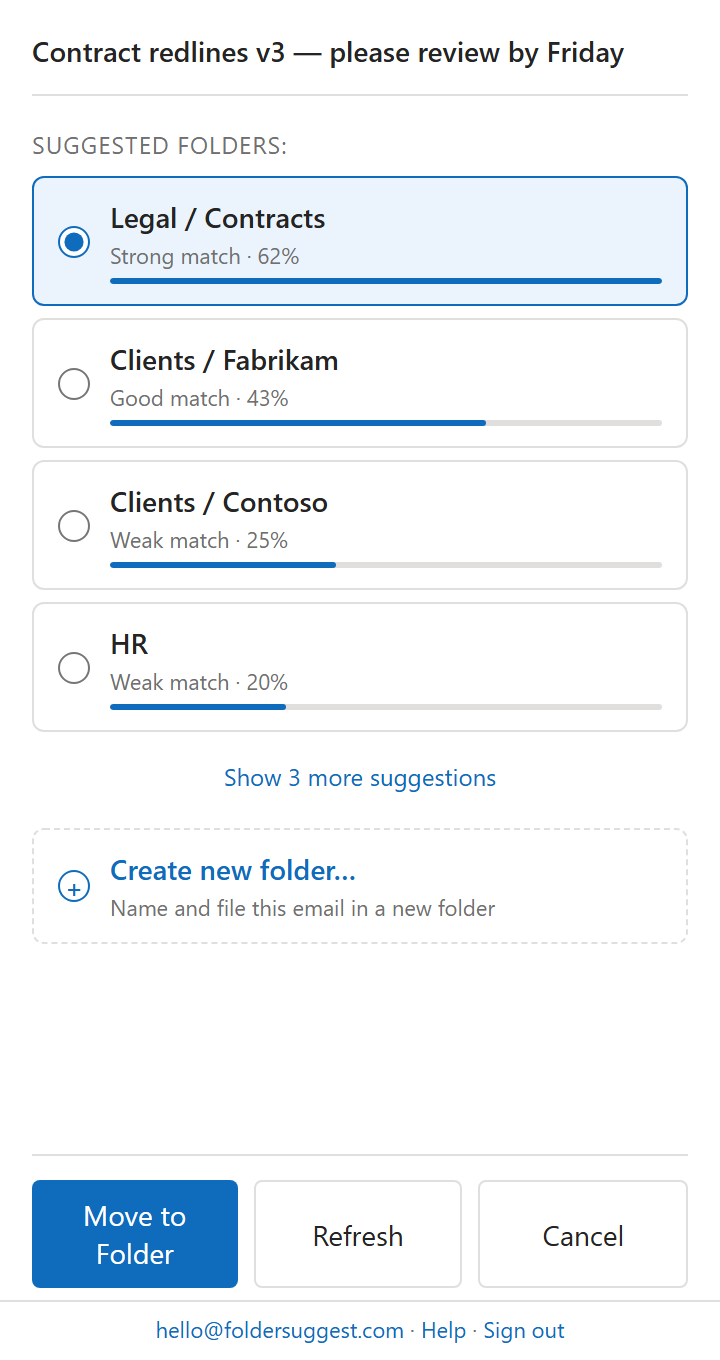
Two points matter for accountants specifically. The AI reads content, not just the sender, so the same client contact emailing about different engagements still gets matched correctly. And all of the processing happens on your own device. No email content is sent to an external server, which is the right answer when you are handling confidential financial data. There are several ways to automate filing in Outlook, and this is the one that needs no rules to set up.
Standardise the work you repeat
Every accountant repeats the same tasks across dozens of clients. The returns differ in detail but the process is the same. Anything you do more than ten times in a season is worth standardising before the season starts.
- Build templates for recurring emails. The document request, the draft-ready note, the deadline reminder. Write each one once, then reuse it.
- Fix your naming conventions. A consistent file and folder naming scheme removes the small daily hesitation of deciding where something goes and what to call it.
- Review your tool set in December. The worst time to learn a new feature is at peak load. The best time is the quiet month before, when you can check what your existing software already does that you are not using.
These changes look minor on any single task. Across a season of repetition, they add up to real hours.
Protect focus with timeboxing
When the workload feels endless, the instinct is to work in one long blur. That is the least productive way to do it.
Timeboxing is the simple discipline of working in fixed, focused intervals. The Pomodoro method, 25 minutes of work followed by a 5-minute break, is popular because it holds up under pressure. The breaks are not a luxury. They are what let you keep concentrating into the evening hours that busy season demands.
A "not-do" list helps too. Alongside your to-do list, keep a short note of the things you will deliberately not touch today. It keeps your attention on the deadlines that actually move, instead of the small tasks that feel productive but are not.
The habit that matters most
If you take one thing from this, make it the separation between focused work and reactive work. Busy season punishes accountants who let email, calls, and quick questions dictate their day. It rewards the ones who decide when to be reachable and defend the rest.
The folder structure, the templates, and the email batching all serve that one goal. They keep the small stuff from stealing the hours you need for the work that pays.
Folder Suggest is free to start and works the moment you install it, with no rules to configure. It is a small way to take one repetitive task off your plate before the season gets loud.
Add to Outlook