How Lawyers Recover Billable Hours Lost to Admin
Most lawyers bill a fraction of the hours they actually work. The gap is admin. Closing even part of it is worth more than working later.
Lawyers recover billable hours by capturing time as they work rather than reconstructing it at day’s end, treating email as a scheduled task instead of a background hum, keeping matters separated and findable, automating repeated documents, and declining work deliberately. Matter-based email filing underpins most of it: time is lost searching for correspondence that was never filed, and unfiled mail makes reconstructing a day’s work slower and less accurate. Folder Suggest files email to the right matter folder in one click, reading each message on-device so privileged content never leaves the machine.
There is a number every lawyer should know about their own day. According to the American Bar Association and Clio's Legal Trends research, the average lawyer bills only about three hours out of an eight-hour day. Some studies put working utilisation closer to 30 percent. The rest of the day goes to work that is necessary but does not appear on any invoice.
That gap is not a personal failing. It is the structure of the job. Time capture, document handling, scheduling, and email all sit between you and the legal work that clients pay for. The lawyers who do well are not the ones who simply work longer. They are the ones who shrink the admin layer so more of their day reaches the work that counts.
This guide is about that admin layer. Where the hours go, and the habits that win them back.
Capture time as you work, not at the end of the day
The largest source of lost revenue in most firms is not unworked hours. It is unrecorded ones.
When you reconstruct your timesheet at the end of the day, or worse at the end of the week, you forget things. The six-minute call, the quick email, the short review. Each one feels too small to write down, and together they are a meaningful share of your billable work. The industry term for this is billing leakage, and reconstruction is its main cause.
The habit that fixes it is simple and unglamorous. Record time as the work happens, in the moment, rather than from memory later. Whether you use practice management software, a timer, or a running note, the rule is the same. The closer your entry sits to the work, the more accurate and the more complete it is. Lawyers who capture in real time consistently bill more, not because they work more, but because they stop losing what they already did.
Treat email as a scheduled task, not a background hum
Email is the most expensive interruption in a lawyer's day, because of what it interrupts. Drafting, reviewing, and analysis are exactly the high-value tasks that suffer most from being broken up.
The research is blunt about the cost. Knowledge workers lose close to a third of the week to email, by McKinsey's estimate, and a study from the University of California, Irvine found it takes around 23 minutes to return to focused work after one interruption. A lawyer who checks email every few minutes while drafting is paying that cost over and over.
A better pattern is to handle email in defined windows and to close it the rest of the time. Set an expectation with clients about response times so that batching does not read as neglect. Protecting two or three uninterrupted drafting blocks a day will do more for your billable total than answering every message the second it arrives.
Keep matters separated and findable
Lawyers carry a filing problem that most professionals do not. Work is organised by matter, confidentiality between matters is not optional, and a single client may have several matters running at once. A misfiled email is not just untidy. It is a risk.
A matter-first folder structure handles this better than a client-first one, because the matter is the unit that carries the confidentiality and the billing.
Firms that run a document management system such as iManage or NetDocuments should file to the matter workspace there instead; email management for law firms explains which setup puts the record where.
The difficulty is keeping that structure current when email arrives all day. Filing by hand is accurate but slow, and it is the first thing to slip when you are busy. So correspondence piles up in the inbox, and finding the right thread later becomes its own non-billable task.
This is where Folder Suggest helps. It reads the email you are viewing, compares it against what is already filed in your matter folders, and suggests the right destination so you can file with one click.
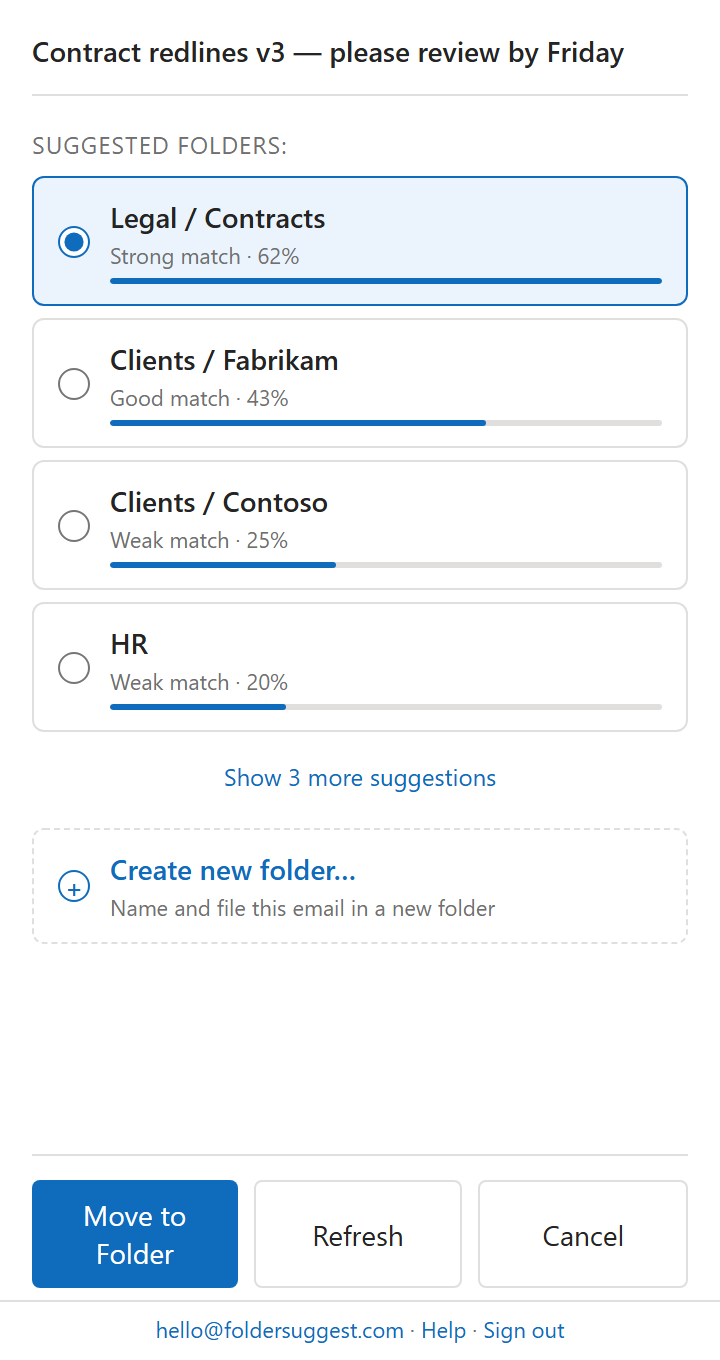
Two things make this fit legal work in particular. The suggestion is based on the content of the email, not only the sender, so the same opposing counsel emailing about two separate matters is matched to the right one. And the processing happens entirely on your own device. No email content leaves your machine, which is the standard you want when client confidentiality and privilege are in play. For the fuller picture, see why Outlook rules do not scale for professional inboxes.
Automate the documents you produce again and again
Much of a lawyer's drafting is variations on documents that already exist. Engagement letters, standard clauses, routine correspondence, court forms. Re-creating these from scratch is skilled time spent on unskilled work.
Two moves cut most of it:
- Build a template library. Every document you produce more than a handful of times should exist as a clean template with the variable fields marked. Updating a template once is far cheaper than retyping it weekly.
- Stop reformatting by hand. Tables of authorities, numbering, and house styles eat hours that no client values. Set these up properly once so the format takes care of itself.
The goal is to spend your drafting time on the judgement that only you can provide, and as little as possible on the mechanics around it.
Delegate and decline on purpose
Senior lawyers often hold on to admin that a junior or an assistant could do faster, simply because handing it over feels slower in the moment. Over a month, that instinct is expensive.
Be deliberate about what only you can do. Client strategy, advocacy, and the judgement calls belong to you. Scheduling, formatting, and first-pass document assembly usually do not. Moving the second category off your desk is the most direct way to raise the share of your day that is billable.
A short daily "not-do" list helps here. It names the tasks you are choosing to leave, delegate, or defer, which keeps your attention on the work that carries your rate.
The habit that matters most
Recovering billable hours is rarely about finding new time. It is about losing less of the time you already work. Capture it as it happens so it is not forgotten. Defend your focus blocks so the deep work gets done. Keep your matters sorted so the admin around them stays small.
Folder Suggest is one piece of that. It is free to start, it works the moment you install it, and it takes one repetitive, non-billable task off your day with no rules to maintain.
Add to Outlook